
Stop the Stutter: Async Asset Loading for Better Game Performance
In this issue, we’re focusing on responsiveness—the one thing players won’t forgive when it breaks. Because no matter how beautiful your game looks, if it stutters, immersion breaks instantly.

Editor’s Note
How are you doing, folks? Welcome back to Game Dev Assembly 🚀
In the last issue, we explored how lighting makes players feel. In this issue, we’re focusing on responsiveness—the one thing players won’t forgive when it breaks. Because no matter how beautiful your game looks, if it stutters, immersion breaks instantly.
We unpack async asset loading as your core architecture.
If lighting goes unnoticed when it works, async loading goes completely unseen. But when it fails, players notice immediately, and they call your game broken. Let’s make sure they never do!
Come and find out, along with the latest tips, news, game events, and jobs in the industry.🔥

Table of Contents
Practical Insights for Developers
Tip 1: Object Pooling Isn’t Always Faster
Tip 2: Input Buffering Makes Games Feel Responsive
Tip 3: Debug Visualization Saves Hours
Witnessing Our First Failure
I’ll never forget our first console certification failure. We’d spent eighteen months building what we thought was a solid game, only to get rejected because our load times exceeded platform requirements. The worst part? We hadn’t even noticed the problem. Our dev machines were too fast, masking issues that would plague every console player.
That failure taught me something crucial: async asset loading isn’t some advanced optimization you tackle after shipping. It’s the fundamental architecture that makes or breaks player experience. Three shipped titles later, here’s what I wish someone had told me from the start.
When Your Loading System Becomes the Problem
Picture this: your player opens a door to a new area. The game freezes for half a second while loading textures. They don’t see a loading screen or any indication of what’s happening, the game just stops responding. From their perspective, it’s broken. Maybe it crashed. They mash buttons, nothing happens, and frustration builds.
This was our reality on that first project. We were loading assets synchronously whenever we needed them, blocking everything until the disk finished reading. On our SSDs, these loads took 50-100 milliseconds, barely noticeable during testing. On the PS4’s hard drive? Sometimes three full seconds. Players thought the game was crashing.
The human brain perceives anything over 100ms as lag. But honestly, even 50ms hitches add up. When they happen every time that you turn a corner or trigger an effect, your game feels unpolished. Players can’t articulate why, they just know something feels off. Review scores suffer, word of mouth dies, and you’re left wondering what went wrong.
How We Actually Solved It
The solution sounds straightforward: move your loading off the main thread. Let the game keep running while assets load in the background. But implementing this properly took us months to get right, with plenty of false starts along the way.
Here’s the basic flow we landed on. When you need an asset, you submit a request to a queue instead of loading it immediately. Separate worker threads grab requests from this queue, read from disk, decompress data, and prepare everything for use. Once ready, the main thread picks up the completed asset and handles the final setup: uploading to GPU memory, hooking up references, and making it live in the scene.
The tricky part nobody warns you about is that GPU uploads still happen on the main thread and they’re expensive. We were so proud of our async loading system, and then discovered we were still causing hitches by uploading 50MB textures in a single frame. Now we spread large uploads across multiple frames, budgeting maybe 2-3ms per frame for GPU work. A texture might take three frames to fully stream in, but players never notice. They do notice when the frame rate tanks, though.
Dependencies Are Where Things Get Messy
Our second project nearly shipped with a nightmare bug. Characters would sometimes appear without textures, rendering as pink blobs. Particle systems would crash referencing materials that hadn’t loaded yet. The issue? We were loading everything async, but pieces finished at unpredictable times.
A character model needs its textures, skeleton rig, and animations. If the model loads first, what do you render it with? If textures load first, where do you put them? We were hitting race conditions constantly, and debugging was hell because the bugs only appeared sometimes, depending on which asset won the loading race.
The fix that saved us: make dependencies explicit in the asset pipeline itself. Every asset declares what it needs at build time. Materials list their textures. Characters list their meshes and animations. The loading system won’t finalize anything until all its dependencies are ready. It seems obvious now, but it took weeks of crashes to figure out.
We also added priority levels so that critical gameplay assets, the stuff players need immediately, can jump to the front of the queue. Environmental detail in the distance? That can wait. When a player approaches a door, assets for the next room get maximum priority. Background scenery loads when there’s spare bandwidth. This isn’t rocket science, but it did require actual playtesting data to tune properly. You can’t guess which assets matter most; you have to watch real players and see what they interact with.
Show Players Something, Anything
Here’s a dirty trick that dramatically improved our perceived load times: always show placeholder assets immediately. Load a blurry, low-res version of textures first, then swap in the high-quality versions as they finish streaming. The full-resolution asset might take just as long to load, but players see something instantly instead of staring at empty space.
For 3D models, we keep simplified versions that instantiate immediately while the detailed mesh loads. The swap happens so fast during gameplay that players don’t consciously notice the transition. What they do notice, and what killed us before, is when nothing appears at all.
Open world games need streaming zones. We slice the world into regions and aggressively load everything in the current zone plus neighboring zones. Anything beyond that gets unloaded to free memory. The key is making zones large enough that loading finishes before players can reach the boundary. This requires testing on the slowest hardware we support, because what works on an SSD fails miserably on a mechanical drive.
What Actually Works in Practice
I’ve shipped games on Unity, Unreal, and custom engines. Each handles async loading differently, and each has its quirks. Unity’s Addressables system does dependency management for you, which is great until you need to debug why something isn’t loading. Unreal’s streaming volumes work beautifully if you understand the priority system; otherwise, you’ll fight mysterious resource starvation issues.
Custom engines give you complete control, which means you own every bug. I’ve spent countless hours debugging threading issues, race conditions, deadlocks, all the classics. The flexibility is worth it for some projects, but don’t underestimate the cost of engineering.
The single best advice I can give is to constantly test on the slowest hardware you’re targeting. I keep a test machine with the minimum specs we support, old hard drive, lower end CPU, the works. So many issues only appear on slow storage. That three-second freeze? Never happened to our development machines. Caught it just in time before submission.
Also, optimize your assets before you optimize your loading code. On our current project, I spent two weeks improving texture compression and mesh processing. This has cut asset sizes by 40%. That meant 40% less data to load, which was way more impactful than any code optimization. Sometimes the best loading system is one that loads less stuff.
Why This Matters More Than You Think
I used to think async loading was an optimization you tackled near the end of development, after the game was done. I was wrong. It’s the fundamental architecture that affects how you structure your entire codebase. Retrofitting async loading into a project built around synchronous loads is absolutely miserable.
Now I start every project with async loading infrastructure in place, even during early prototyping. Yes, it’s more upfront work. But the alternative, which is shipping a game that freezes randomly because you’re blocking on I/O, isn’t acceptable anymore. Players expect polish. They expect responsiveness. They won’t forgive a game that feels broken, even if the underlying gameplay is solid.
Your loading system is invisible when it works and catastrophic when it doesn’t. Players will never consciously think, “Wow, great async loading implementation.” But they’ll absolutely notice if it’s missing, and they’ll describe your game as janky, unpolished, or broken. After three shipped titles and one certification failure, I’ve learned that keeping your game responsive isn’t optional. It’s the baseline for professional game development.
Practical Insights for Developers
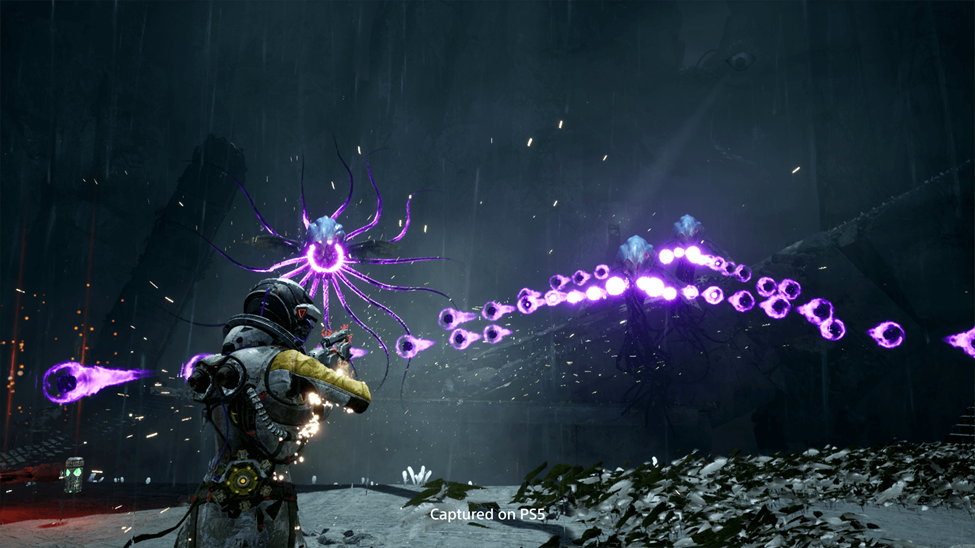
Tip 1: Object Pooling Isn’t Always Faster
Pooling can help reduce garbage collection spikes, but pooling everything can make your game slower. Managing large pools adds overhead that sometimes costs more than creating objects on demand.
Rule of thumb: Only pool objects that are created and destroyed frequently, take time to initialize, or are expensive to load. And always pre-warm pools before gameplay to avoid sudden stutters.
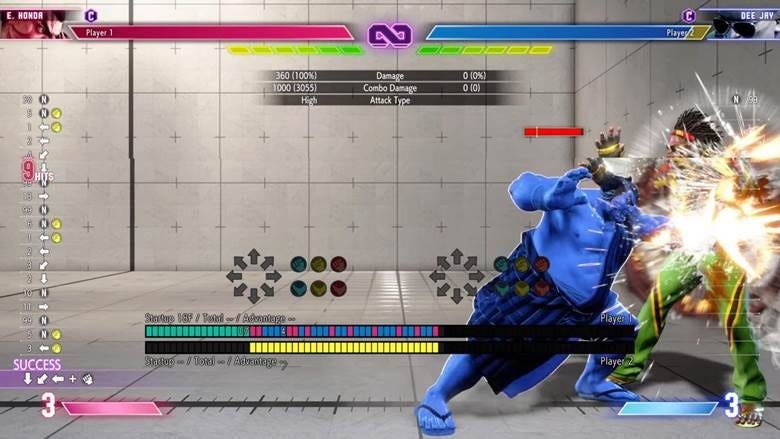
Tip 2: Input Buffering Makes Games Feel Responsive
Even at 60fps, it’s easy to miss quick button presses if you only check inputs once per frame. That’s why some games feel unresponsive even with perfect framerates.
Fix: Add a short input buffer so the game remembers recent button presses for a brief window. It lets players queue actions slightly before they’re allowed, making combat and movement feel tight and intuitive.
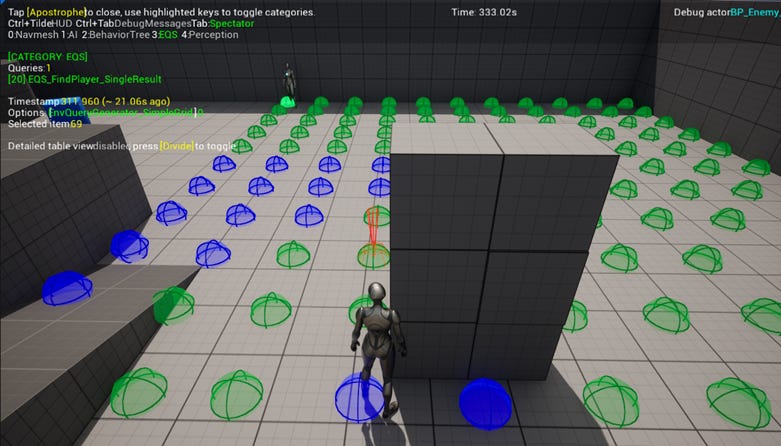
Tip 3: Debug Visualization Saves Hours
Traditional debugging tools don’t help when bugs appear only during live gameplay. Visual debugging does.
Tip: Show what’s happening directly in your game world; draw detection zones, AI states, or pathfinding lines in-game. Use colors consistently (green for good, red for errors) and add a free-camera mode to inspect systems in real time. Once you start visualizing data, hidden problems become obvious and fixing them becomes much faster.
About the Author
By Akash Roy, founder and game developer at Broken Bulb Studio, with over eight years of experience in the game industry. He has contributed to major titles including Redfall and Atomic Heart, as well as a mobile optical system for a U.S. military aviation program. He is currently developing original IP that celebrates Indian culture through interactive experiences, while actively leading and growing the Unreal Engine and game development community in Indore.
Top Dev Headlines (February 2026)
Scopely acquires majority stake in Loom Games: The Turkish mobile studio behind Pixel Flow! has been valued at over $1 billion as Scopely moves to expand its portfolio. Consolidation in mobile isn’t slowing down, and proven studios with scalable hits remain prime acquisition targets.
Snail Games to showcase ARK franchise updates at GDC 2026: Snail Inc. is readying fresh developments and portfolio expansions ahead of this year’s Game Developers Conference. Established franchises are doubling down on long-term ecosystem growth rather than one-off releases.
Lyrical Games signs major publishing deal with The Chinese Room: A new strategic partnership aimed at navigating indie development and publishing amid industry turbulence. Strategic publishing partnerships are becoming critical for indie studios looking to manage risk and secure funding.
Report states that NetEase prepares layoffs at Spliced Inc.: Internal LinkedIn posts suggest job cuts at the NetEase-owned studio, highlighting ongoing industry workforce shifts. Even major publishers are restructuring, reinforcing the need for leaner teams and sustainable production models.
Xsolla backs State of the African Video Game Industry 2026 report: A new data-driven study provides insight into Africa’s rapidly growing games ecosystem and developer landscape. merging markets like Africa are becoming serious growth regions for talent, investment, and new player bases.
Upcoming Game Events
Winter London Anime & Gaming Con 2026 (London, England) – Feb 20-22: A huge anime and gaming fan event featuring cosplay, tabletop, gaming culture, and community meetups, perfect for networking and creative inspiration.
Bristol Video Games Expo (Bristol, England) – Feb 28: A one-day celebration of games from retro to modern with tournaments, speakers, and hands-on play, all of which is great for grassroots community vibes.
Valorant Champions Tour: Santiago Masters (Santiago, Chile) – Feb 28-Mar 15: Major international esports tournament bringing top Valorant teams together. This is a standout competition for developers and esports observers alike.
GAMA Expo (Louisville, KY, USA) – Mar 1-5: A major trade show connecting game creators, exhibitors, and industry experts with panels, demos, and networking opportunities.
GDC Festival of Gaming / Game Developers Conference 2026 (San Francisco, CA, USA) – Mar 9-13: The premier global industry event focused on design, tech, networking, and learning for game creators.
Tool of the Week: Unity ML-Agents
If async loading is your architecture, testing it under pressure is your reality check. Unity ML-Agents lets you train AI agents inside your game to simulate real player behavior at scale. But beyond smart NPCs, there’s a powerful secondary use most teams overlook: stress testing.
You can use ML-Agents to repeatedly trigger doors, spawn systems, combat encounters, streaming zones, and edge-case interactions—thousands of times. That’s how you expose race conditions. That’s how you catch asset dependency failures. That’s how you discover the one loading hitch that only happens when three systems fire at once. Humans don’t test like machines. They don’t break your game with perfect repetition. ML-Agents does.
Quick Dev Tips
Build Async First, Not Last: If your systems assume assets are always ready, you’re building a future headache. Design everything with “this might still be loading” in mind. Retrofitting async later is painful, risky, and expensive.
Budget Frames Like They’re Currency: Async loading doesn’t save you if you blow your frame on GPU uploads. Spread heavy texture and mesh uploads across multiple frames. A steady 2–3ms cost beats a single 20ms hitch every time.
Test Where It Hurts: Your high-end dev PC hides problems. Test on the slowest hardware you support such as old drives, weaker CPUs, or limited memory. If it runs smoothly there, you’re on solid ground.
Game Dev Jobs Board
Remote Unity Developer – Hitapps: A full-time remote role focused on Unity development with room for senior or middle experience. It’s perfect for engineers who want to build gameplay systems from anywhere.
Unity Developer (Gameplay, R&D) – Saint.wtf: Work remotely on Unity projects spanning core gameplay and R&D. This a great fit for developers who enjoy prototyping and pushing engine limits.
Unity Developer – SkillCampVR: Remote full-time role building and optimizing VR training apps in Unity for Quest and Pico. Ideal for experienced Unity devs with commercial VR experience.
Senior Unity SDK Technical Lead – Hypercell Games: A remote senior Unity lead role shaping core SDK systems. This is great for experienced engineers who want to influence tooling and platform architecture.
Unity C# Developer – Shocking Dog Games: Flexible remote position (including part-time) focused on C# gameplay systems in Unity. This is ideal for developers who want varied project work.
Join the Next Batch of AI Agent Builders (Cohort 3)
Over 120+ engineers have already built AI Agents through Cohorts 1 & 2.
In Cohort 3, you could be one of them.
This is a live, hands-on weekend cohort built for developers who want to move beyond static NPC logic and scripted behaviors and start building intelligent, autonomous game systems.
In just one weekend, you’ll build AI agents that can:

Reason about game state and player behavior
Call tools (APIs, in-game systems, data sources)
Take actions dynamically inside gameplay loops
Run multi-step workflows for quests, world events, and live ops
Using LangChain, AutoGen & CrewAI. With live coding and mentor support from experts at Microsoft & Google.
Exclusive for Our Newsletter Readers
As part of our NL community, you get 30% off your seat.
Use code: GAME30 (Valid for a limited time)
If AI agents are on your 2025 roadmap, this is your moment.
Secure your discounted seat here: https://www.eventbrite.com/e/build-ai-agents-over-the-weekendcohort-3-tickets-1980455085473?aff=gamedev
Miss this cohort, and you will have to wait for the next one.
Closing – Until Next Week

As we’ve journeyed through Akash’s words, we learn that performance is a promise we make to our gameplayers.
If this issue made you rethink how your game loads, streams, or handles pressure under the hood, don’t keep it to yourself. Share it with your teams and friends. Drop it in your studio Slack. Send it to the dev who’s been chasing that mystery hitch for weeks.
The industry doesn’t reward games that almost feel good. Players expect smooth. They expect instant. They expect it to just work.
If you’re serious about building games that feel tight, responsive, and production-ready on real hardware, subscribe today as we have more exciting news coming up.
More deep dives. More practical breakdowns. No fluff.
Forward this. Share it. And if you haven’t already, hit subscribe so you don’t miss the next drop. 🚀🎮
Warm Regards,
Game Dev Assembly Team